simpleTracker
Managing Tasks and Subtasks
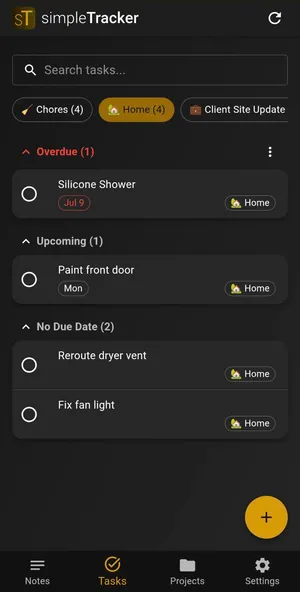
Tasks in simpleTracker are designed for things you need to do — with subtasks, due dates, and optional recurrence to keep you on track.
Creating a Task
- Navigate to the Tasks tab
- Tap the + button
- Give your task a title and optionally a description
- Set a due date if it has a deadline
- Assign it to a project if relevant

Adding Subtasks
Break larger tasks into smaller steps:
- Open a task
- Add subtasks (up to 50 per task)
- Check off subtasks as you complete them
- The parent task shows progress based on subtask completion

Due Dates
Tasks with due dates show visual indicators:
- 🔴 Overdue — past the due date
- 🟡 Due today — needs attention now
- 🔵 Due tomorrow — coming up next
Recurring Tasks
For tasks that repeat on a schedule:
- Open a task and enable recurring
- Set the interval: every N days, weeks, or months
- Choose the anchor:
- Due date — the next occurrence is calculated from the due date
- Completion date — the next occurrence is calculated from when you actually finish it
When you complete a recurring task, a new instance is automatically created based on your settings.

Searching and Filtering
Use the search bar at the top of the Tasks tab to find tasks by title. Filter by project to focus on a specific area of work: